

Feature
A wedding photo gallery your guests can add to
Collect wedding photos in one gallery on your guest page. Hosts upload, guests on your list sign in and add theirs, and you can remove anything at any time.
After a wedding, the best photos are on a hundred phones. The gallery sits on the same link guests already have, so nobody has to find a new group or a new folder.
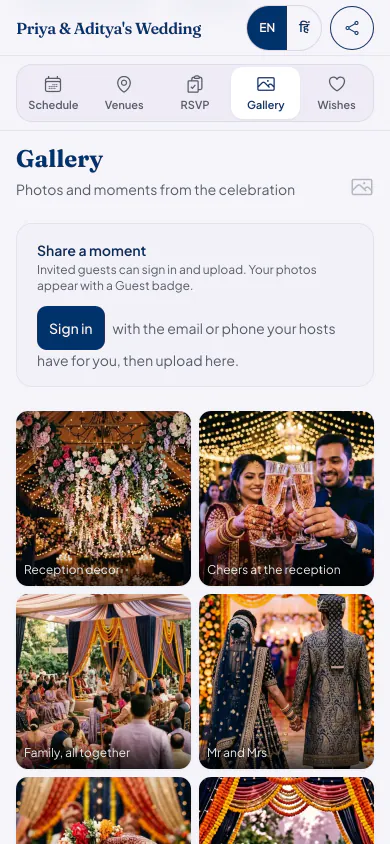
How the gallery works
You add the first photos
Upload photos and videos on the website or in the app. They appear on the guest page straight away.
Guests sign in to add theirs
A guest on your list signs in with the phone number or email you saved for them, and adds photos or videos from their phone.
Everyone looks in one place
Anyone who can open your page can see the gallery. Photos from guests carry a small From a guest label.
You stay in charge
Hosts and co-hosts can remove any photo. Turn Photos off in What guests can use, and guests can no longer add to it.
Good to know
- Guests must be on your guest list to add photos. Anyone else with the link can look but not add, which keeps strangers out of your gallery.
- Each plan has its own limit on photos, videos and storage, shown below. When the gallery is full, guests are told to let you know.
- Find your photos is a separate choice. It stays off until you turn it on.
- The gallery follows your page's privacy: if guests must sign in or enter a code to open the page, the same applies to seeing the gallery.
Who it suits
Families who want guests' candid photos without a WhatsApp group that never ends.
Hosts who want one place for the photographer's picks and the phone photos.
Relatives who could not travel, and want to see the wedding afterwards.
Gallery questions hosts ask
Can guests upload photos without an app?
Yes. A guest on your list signs in on the page in their phone's browser and adds photos from there. There is nothing to install.
Can anyone with the link add photos?
No. Anyone who can open the page can see the gallery, but only guests on your list can add to it, after signing in.
Can I remove a photo a guest added?
Yes. Hosts and co-hosts can remove any photo or video, and you can stop guests adding more by turning Photos off.
Can a QR code at the venue open the gallery?
A QR code opens your guest page, and the gallery is a tab on that page. Download the QR code from your celebration and show it at the venue. Guests on your list sign in there to add photos.
What it costs
Every plan has every feature on this page. Plans differ in how many guests and photos they fit. Prices are per celebration, in rupees.
Starter
Free first year
Up to 50 guests
then ₹499 for each extra year
Classic
₹14,999 one-time
Up to 400 guests
then ₹1,499 for each extra year
Grand
₹29,999 one-time
Unlimited guests (fair use)
then ₹2,999 for each extra year
Hosts can also run everything from the Android app. Get the app
Celebrations full of photos


Read next


Open your gallery to guests
Your page can be live in minutes. Then share one link on WhatsApp.