

Guide
How to put a QR code on your wedding card
Put a QR code on your printed wedding card, so guests can scan it for the schedule, venue maps and RSVP. How to make one, print it and test it.
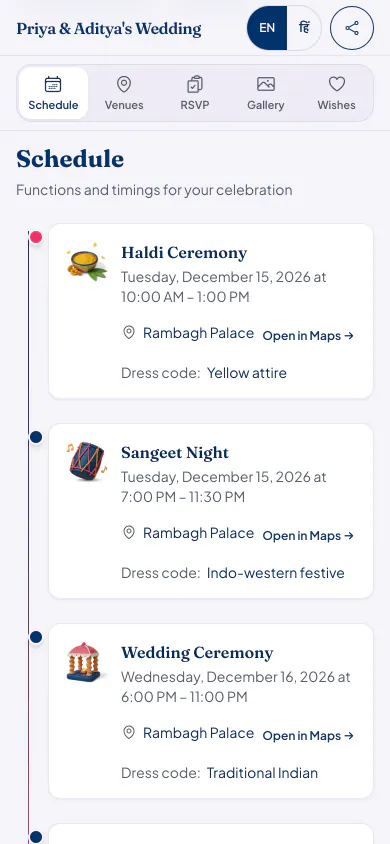
A printed card cannot change, and it has room for only so much. A QR code on the card opens a page that can: every function, each venue with a map link, and a place to reply.
How to do it
Publish your guest page first
Add your functions and venues, and publish. The QR code opens your page's link, and that link stays the same when you edit the details later.
Download the QR code
On your celebration's overview, tap QR code, then Download QR code. You get a picture file to give your card designer.
Place it with a few words
Put it near the RSVP line, with a short note such as 'Scan for the schedule, venues and RSVP', so that guests know what it does.
Test a real proof
Before printing the full order, scan the proof with two or three different phones, in ordinary room light.
So that it scans
- Print it dark on a light background. Gold on cream or white on maroon can look lovely and fail to scan.
- Do not print it too small. Around two to three centimetres across is a common starting point, and your test scan will tell you if it is enough.
- Keep a clear margin around it, with no border pattern touching the code.
- Avoid very shiny foil over the code, because reflections can stop a phone reading it.
- Print the link in words as well, for anyone whose phone will not scan.
Other places a QR code helps
- At the venue entrance, on a stand, so that guests can open the page and see the day's schedule.
- In a hotel welcome note for guests who are staying.
- This QR code opens the page. It is separate from a guest's own entry pass, which is the QR code used for check-in at the door.
Who it suits
Families printing a smaller number of cards, who still want every guest to have the full details.
Weddings where venues or timings may change after the cards go to print.
Hosts who want replies in one place, and not by phone.
QR code questions
Will the QR code stop working if I change the venue?
No. The code opens your page's link, and the link stays the same when you edit the time or the venue. Guests see the new details when they scan.
Do guests need a QR scanner app?
Most phones can scan a QR code with the camera or with a UPI or Google app. The page then opens in the browser, with nothing to install.
Does the QR code cost extra?
No. You can download it from your celebration on every plan, Starter included.
What it costs
Every plan has every feature on this page. Plans differ in how many guests and photos they fit. Prices are per celebration, in rupees.
Starter
Free first year
Up to 50 guests
then ₹499 for each extra year
Classic
₹14,999 one-time
Up to 400 guests
then ₹1,499 for each extra year
Grand
₹29,999 one-time
Unlimited guests (fair use)
then ₹2,999 for each extra year
Hosts can also run everything from the Android app. Get the app
Cards that can carry a QR code


Read next

Make your guest page and its QR code
Your page can be live in minutes. Then share one link on WhatsApp.