

Feature
Your invitation video on the guest page
Upload your wedding invitation video once. It plays at the top of your guest page, above the schedule, venues and RSVP, and you can share it with the link.
Many families now have a short invitation video made, by a designer or on a phone. Instead of sending it on its own, put it on the guest page, where every guest also finds the times, venues and RSVP.
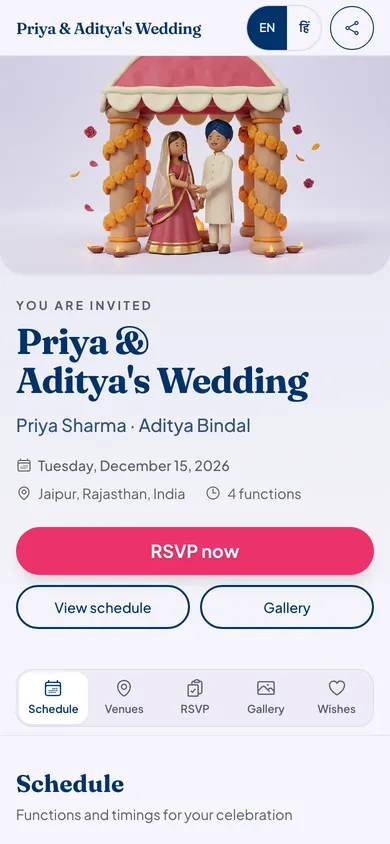
How the invitation video works
Bring your video
Any MP4 or MOV file up to 50 MB. Eventos Hub does not make the video; you upload one you already have.
Upload it on the website
Open Invitations, then How your link looks, and add your video. Uploading is on the website for now, on a phone or a computer, not in the app.
Guests tap to play
It sits at the top of your guest page with your cover photo as its poster. It never starts playing by itself.
Share the video with the link
On a phone that can share files, Share with video sends the video itself along with your link.
Good to know
- One video per celebration. Upload a new one to replace it, or remove it.
- Keep it short. Guests often open the page on mobile data.
- The invitation video is part of every plan, Starter included.
Who it suits
Families who had an invitation video made and want guests to see it next to the details.
Couples who recorded a personal message for relatives who cannot travel.
Hosts of a birthday or an anniversary who made a slideshow of old photos.
Invitation video questions
Does Eventos Hub make the invitation video?
No. Upload a video you already have, made by a designer, an app or your phone. Eventos Hub shows it on your guest page and helps you share it.
What video files work?
MP4 or MOV, up to 50 MB. If yours is bigger, trim or compress it on your phone first.
Can I upload it from the app?
Not yet. Upload it from the website, on a phone or a computer. Guests see it on the guest page either way.
Will the video play by itself?
No. Guests tap to play it, so nobody is surprised by sound in a meeting.
What it costs
Every plan has every feature on this page. Plans differ in how many guests and photos they fit. Prices are per celebration, in rupees.
Starter
Free first year
Up to 50 guests
then ₹499 for each extra year
Classic
₹14,999 one-time
Up to 400 guests
then ₹1,499 for each extra year
Grand
₹29,999 one-time
Unlimited guests (fair use)
then ₹2,999 for each extra year
Hosts can also run everything from the Android app. Get the app
Invitations that suit a video


Read next

Put your invitation video on one link
Your page can be live in minutes. Then share one link on WhatsApp.