

Feature
Digital shagun by UPI, straight to you
Receive shagun online from Google Pay, PhonePe, Paytm or any UPI app, straight to your UPI ID. Eventos Hub never holds the money and takes no cut.
Many guests, especially relatives who cannot travel, would rather send shagun than carry an envelope. Add your UPI ID once, and a shagun section appears on your guest page next to the wishes.
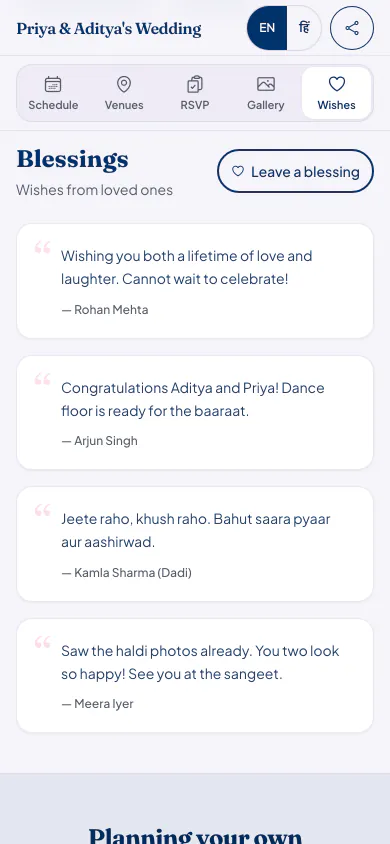
How UPI shagun works
Add your UPI ID
On your celebration's Wishes page, type your UPI ID, such as yourname@okaxis. We check that it looks like a real UPI ID before saving it.
Guests tap Pay with any UPI app
On a phone, the button opens the guest's own UPI app with your UPI ID and a note, such as 'Shagun for Priya & Aditya's Wedding', already filled in.
They choose the amount
The guest types the amount and approves it with their UPI PIN, like any other payment. The money goes from their bank account to yours.
Laptops get a QR code
On a laptop or tablet the page also shows a QR code to scan with a phone, and anyone can copy your UPI ID instead.
Good to know before you turn it on
- Eventos Hub never holds the money and charges nothing on it. The payment is between the guest's bank and yours.
- We do not see or record payments. Your bank or UPI app shows who sent what.
- Payments are in rupees, by UPI. Guests abroad can use it if they have a UPI app linked to an Indian bank account.
- Shagun shows only after you add a UPI ID, and only while the Wishes & shagun switch is on. Turn it off any time.
Who it suits
Families who would rather not collect cash envelopes at the venue, or keep track of who handed over which one.
Relatives who cannot come to the wedding, birthday or griha pravesh and still want to bless you.
Hosts who want shagun in their own account, not held by a website or a payment company.
Shagun questions hosts ask
Does Eventos Hub take a cut of the shagun?
No. Guests pay your UPI ID directly from their own UPI app. The money never passes through Eventos Hub, and we charge nothing on it.
Can I see who sent shagun and how much?
Not on Eventos Hub. The payment happens in the guest's UPI app, so we never see it. Your bank or UPI app lists each payment, and most show the note the page filled in.
Is UPI shagun on the free plan?
Yes. Every plan has every feature, Starter included. Plans differ only in how many guests and photos they fit.
Can guests add a message with the shagun?
The UPI note is filled in for them. To say something, they can leave a wish on the same page, and you choose which wishes show.
What it costs
Every plan has every feature on this page. Plans differ in how many guests and photos they fit. Prices are per celebration, in rupees.
Starter
Free first year
Up to 50 guests
then ₹499 for each extra year
Classic
₹14,999 one-time
Up to 400 guests
then ₹1,499 for each extra year
Grand
₹29,999 one-time
Unlimited guests (fair use)
then ₹2,999 for each extra year
Hosts can also run everything from the Android app. Get the app
Celebrations where families use shagun


Read next


Add shagun to your guest page
Your page can be live in minutes. Then share one link on WhatsApp.