

Guide
How to share wedding photos with guests
WhatsApp group, Google Drive or a gallery on your guest page? How to share wedding photos with guests and collect theirs, and what each way is good at.
Two jobs get mixed up here: giving guests your photos, and getting theirs. The usual tools are good at one or the other, so the right choice depends on which one you care about more.
A simple plan
Decide who should see what
Your full album may be for family, with a smaller set for all guests. Choose before you share a link that gets forwarded.
Ask for photos early
Tell guests where to add photos in your thank-you message, within a few days, while they still have the photos at hand.
Share a selection first
Put the best few up quickly. The photographer's full set often takes weeks, and guests want to see something now.
Keep your originals safe
Whichever way you share, keep the photographer's full-size files in your own storage.
The usual ways, compared
WhatsApp group or shared folder
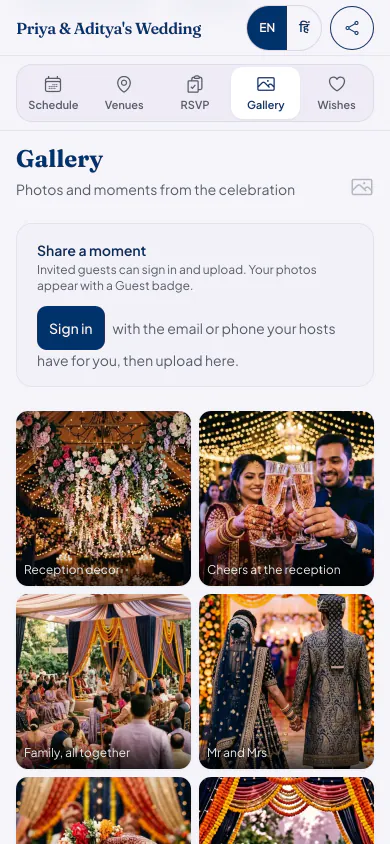
Gallery on your guest page
- Where guests look
- WhatsApp group or shared folder: A new group or a new folder link to find.
- Gallery on your guest page: The link they already have from the invitation.
- Who can add
- WhatsApp group or shared folder: Anyone in the group, or anyone with an editing link to the folder.
- Gallery on your guest page: Guests on your list, after signing in. Others can only look.
- Taking something down
- WhatsApp group or shared folder: Hard in a group, because it is already on every phone.
- Gallery on your guest page: Hosts and co-hosts can remove any photo.
- Full-size originals
- WhatsApp group or shared folder: A shared folder is good for these. WhatsApp usually compresses photos unless you send them at higher quality or as a document.
- Gallery on your guest page: Good for looking and sharing; keep your full-size originals elsewhere.
- Finding yourself
- WhatsApp group or shared folder: Scroll until you see yourself.
- Gallery on your guest page: If you turn on Find your photos, guests who agree can take a selfie to see the ones they are in.
Which way suits you
A shared folder: handing all the full-size photos to the family after the wedding.
A WhatsApp group: a small circle of close friends who are already chatting.
A gallery on your guest page: all your guests, in one place they already know.
Photo sharing questions
What is the easiest way to collect photos from wedding guests?
Give them one place, and remind them once. On Eventos Hub, guests on your list sign in on the page they already have and add photos from their phone, with nothing to install.
Can I use Google Drive for wedding photos?
Yes, and it suits full-size originals well. Anyone with an editing link can also change or remove files, so many families share a view-only link with guests and keep editing to a few people.
Can guests find just the photos they are in?
With Find your photos, yes, if you turn it on. It is off until then. A guest agrees first and takes a selfie, and sees the gallery photos they are likely in.
What it costs
Every plan has every feature on this page. Plans differ in how many guests and photos they fit. Prices are per celebration, in rupees.
Starter
Free first year
Up to 50 guests
then ₹499 for each extra year
Classic
₹14,999 one-time
Up to 400 guests
then ₹1,499 for each extra year
Grand
₹29,999 one-time
Unlimited guests (fair use)
then ₹2,999 for each extra year
Hosts can also run everything from the Android app. Get the app
Celebrations full of photos


Read next


Put your photos on one page
Your page can be live in minutes. Then share one link on WhatsApp.