

Feature
Online RSVP for every function
Collect wedding RSVPs online, function by function: who is coming, how many with them and their food preference. See a headcount for each and download the list.
Guests reply from the link you send, with no app to install and, on a page open to anyone with the link, no account. Every reply lands in your guest list, and Insights shows a headcount for each function, plus-ones included.
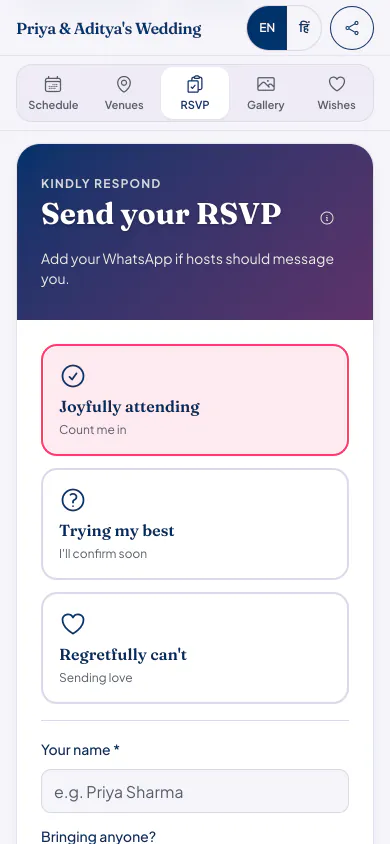
How RSVP works
Guests open your link
From WhatsApp, email or anywhere you share it. The RSVP tab is on the page, in English or Hindi.
They answer in a tap
Joyfully attending, Trying my best, or Regretfully can't. Guests who are coming add how many they are bringing and any food preference, such as Jain or no onion.
They pick their functions
When your celebration has more than one function, a guest who is coming ticks the ones they will attend.
You see the numbers
Replies land in your guest list, and Insights shows a headcount for each function. Download the list as a CSV file for the caterer.
Good to know
- Guests can change their answer later with Change my response, from the same phone.
- Replies close at midnight after your last function, in your celebration's time zone, so nobody replies to a party that is over.
- On a page that opens with an invite code or a password, guests enter it once. Invites you send from Eventos Hub carry a personal link that opens the page without it.
- There are no automatic reminders to guests. To nudge someone, send their invite again on WhatsApp or by email.
Who it suits
Hosts with several functions who need a separate count for the haldi, the sangeet and the reception.
Families feeding guests with different food needs, who want them written down, not remembered.
Anyone tired of counting replies across WhatsApp groups, phone calls and a spreadsheet.
RSVP questions hosts ask
Do guests need to sign up to RSVP?
No. On a page open to anyone with the link, guests reply without an account. On a page with an invite code or a password, they enter it once, or open the personal link from their invite.
Can a guest come to some functions and not others?
Yes. When a celebration has more than one function, a guest who is coming ticks the functions they will attend. The headcount for each function counts only those guests and their plus-ones.
Can I set an RSVP deadline?
Not a date of your own. Replies close by themselves at midnight after your last function. To get answers sooner, post the date you need them by as a pinned update.
Can I download the replies?
Yes. Download the guest list as a CSV file, with each guest's reply and a column for each function. It opens in Excel or Google Sheets.
What it costs
Every plan has every feature on this page. Plans differ in how many guests and photos they fit. Prices are per celebration, in rupees.
Starter
Free first year
Up to 50 guests
then ₹499 for each extra year
Classic
₹14,999 one-time
Up to 400 guests
then ₹1,499 for each extra year
Grand
₹29,999 one-time
Unlimited guests (fair use)
then ₹2,999 for each extra year
Hosts can also run everything from the Android app. Get the app
Invitations with RSVP built in


Read next


Start collecting RSVPs today
Your page can be live in minutes. Then share one link on WhatsApp.