

Feature
WhatsApp invitations with an RSVP link
Send wedding invitations to every guest on WhatsApp from our official number, or share the link yourself. Guests tap it to see each function and RSVP.
Most families already invite on WhatsApp. The difference is what guests get: not a forwarded PDF, but a link to one page with every time, venue and RSVP, which stays current when plans change.
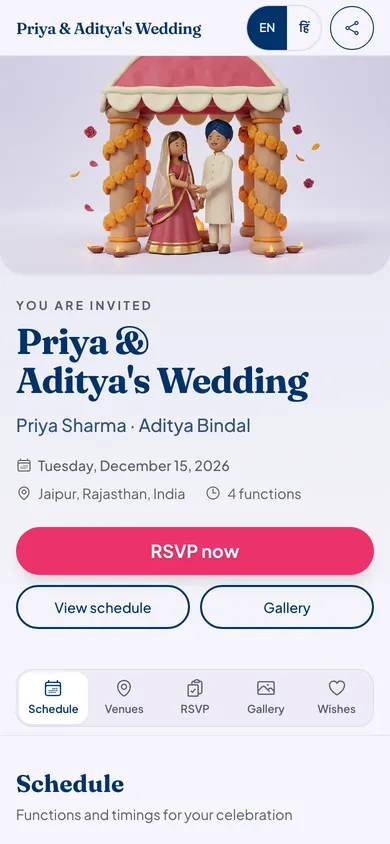
How WhatsApp invitations work
Add guests with their mobile numbers
Build your guest list on the website or in the app. Each guest with a mobile number can get a WhatsApp invite.
Publish your page
Invites go out only for a published page, so every link opens for the guest who taps it.
Send from our official number
Pick guests and send. Each gets an approved WhatsApp invite from the Eventos Hub business number with your celebration's name and its link. On a page with an invite code or a password, each guest's link opens the page without the code.
Or share it yourself
Tap Share on WhatsApp to send the link from your own number, to one person or a family group.
Good to know
- You can read guests' replies to the invite, and replying STOP ends all messages from our number to that phone.
- Guests who said they are not coming are skipped when you send again.
- Sending is part of every plan. We limit how often one guest can be messaged, so invites never feel like spam.
- Prefer email? Send the same invite by email, with your own card attached if you like.
Who it suits
Families whose relatives live on WhatsApp and rarely open email.
Hosts with long guest lists who do not want to forward the same card two hundred times.
Anyone who wants each guest's reply on the page, not scattered across chats.
WhatsApp questions hosts ask
Will the invite come from my number?
If you tap Share on WhatsApp, yes: it opens your own WhatsApp with the link ready to send. If you send from Eventos Hub, it comes from our official business number with an approved invite message, and you can read the replies.
Does it cost extra to send WhatsApp invites?
No. Sending invites from our number is part of every plan, Starter included. Your plan's guest limit still applies.
Can guests stop the messages?
Yes. Replying STOP ends all messages from our number to that phone.
Can I send our card design too?
The link preview shows the picture you choose: an invitation card made from your names, date and colours, your cover photo, or your own design. To send your PDF card as well, share it from your own WhatsApp or attach it to an email invite.
What it costs
Every plan has every feature on this page. Plans differ in how many guests and photos they fit. Prices are per celebration, in rupees.
Starter
Free first year
Up to 50 guests
then ₹499 for each extra year
Classic
₹14,999 one-time
Up to 400 guests
then ₹1,499 for each extra year
Grand
₹29,999 one-time
Unlimited guests (fair use)
then ₹2,999 for each extra year
Hosts can also run everything from the Android app. Get the app
Invitations families send on WhatsApp


Read next

Send your invitation on WhatsApp today
Your page can be live in minutes. Then share one link on WhatsApp.