

Event planner app
An event planner app for the events families host
Plan a wedding, birthday or family function on one link: invitations on WhatsApp, RSVP for each function, guest list, photos and UPI shagun. Free for 50 guests.
Eventos Hub is an event planner app for Indian family events: a wedding with several functions, a birthday, an anniversary, a naamkaran, a godh bharai or a griha pravesh. You plan on the website or in the iPhone and Android app, and guests get one link with the schedule, venues, RSVP, photos and shagun. Your first celebration is free for its first year, for up to 50 guests.
What you can plan
Anything a family hosts and invites people to, with one function or several. Each kind has its own page with timing advice and an invitation message to copy.
How you plan with it, in the order hosts do
Create the celebration
Give it a name and a date, and pick Wedding, Engagement, Birthday or Anniversary, or Something else in your own words, such as Griha pravesh or Kitty party.
Add the functions and venues
Add each function with its own date and time: the haldi and the reception, or the puja and the lunch. Add each venue with its address and an Open in Maps link.
Add your guests
Type names in, pick them from your phone's contacts, or import a CSV sheet. Sort them into named lists, such as Bride's family, so a private function goes only to them.
Send the link
Send invites from our official WhatsApp number or by email, or share the link from your own WhatsApp. For invites from our number, you see who has read them.
Watch the replies add up
Guests reply for each function, with plus-ones and food preference. You see a headcount for each function and can download the list as a CSV file for the caterer.
On the day, and after
Check guests in at the door by scanning the entry pass QR code on their guest page. Afterwards, the photos, wishes and shagun to your UPI ID are all on the same link.
What it does not do
Eventos Hub plans the guest side of a family event: who is invited, who is coming to what, and where everyone needs to be. Some apps called event planners do other jobs, so here is what you will not find.
- No ticket sales or paid registration.
- No conference agenda, speaker profiles, badges or sponsor pages.
- No budget tracker or expense sheet.
- No vendor search or booking: you book your caterer, decorator and photographer yourself.
- No seating chart or table plan.
- No card designer. Upload a cover photo or an invitation video you already have.
- No automatic reminders to guests. You send an invite again yourself when someone has not replied.
How it compares with other kinds of event app
Four kinds of app answer to the words event planner. They are good at different things, so pick the one that matches your job.
Eventos Hub
To-do and budget planner
Card maker app
Corporate event platform
- Made for
- Eventos Hub: Families hosting a wedding or a family function
- To-do and budget planner: Keeping your own checklist and spending in order
- Card maker app: Designing a card image or video
- Corporate event platform: Conferences, launches and ticketed events
- What guests get
- Eventos Hub: One link with every function, venue maps and updates
- To-do and budget planner: Usually nothing: the plan stays on your phone
- Card maker app: An image, a video or a card link
- Corporate event platform: A registration page, often an attendee app
- RSVP for each function
- Eventos Hub: Yes, with plus-ones, food preference and a headcount per function
- To-do and budget planner: You type replies in yourself
- Card maker app: Varies; often one yes or no, if any
- Corporate event platform: Registration and tickets, often per session
- Hindi for guests
- Eventos Hub: One tap switches the page to Hindi
- To-do and budget planner: Depends on the app
- Card maker app: Depends on the design
- Corporate event platform: Depends on the platform
- UPI shagun
- Eventos Hub: Straight to your own UPI ID, no cut taken
- To-do and budget planner: Not part of the job
- Card maker app: Not part of the job
- Corporate event platform: Ticket payments, not gifts
- Guests install an app?
- Eventos Hub: No, any phone browser
- To-do and budget planner: Guests are not involved
- Card maker app: No
- Corporate event platform: Sometimes
- How it is priced
- Eventos Hub: First celebration free for a year up to 50 guests, then a one-time price per celebration
- To-do and budget planner: Often free, or a subscription
- Card maker app: Free designs, with paid designs or a subscription
- Corporate event platform: Usually per event or per attendee, often on a quote
Get the app
Hosts and co-hosts can plan from the iPhone or Android app, or on the website with the same account. Guests never need the app: they open your link in any phone browser.
Who it suits
The person in the family everyone calls to ask what time and where, for a wedding or a smaller function.
Hosts of a birthday, anniversary, naamkaran or griha pravesh who want a headcount without phoning everyone.
Families with relatives in other cities or abroad, who need one link instead of a card, a location and a group chat.
Event planner app questions
Is Eventos Hub free?
Your first Starter celebration is free for its first year, for up to 50 guests, with every feature. A bigger celebration uses Classic, for up to 400 guests, or Grand, with no guest cap (fair use), each a one-time price per celebration shown in rupees before you pay. Nothing renews automatically.
Can I plan a birthday party with it?
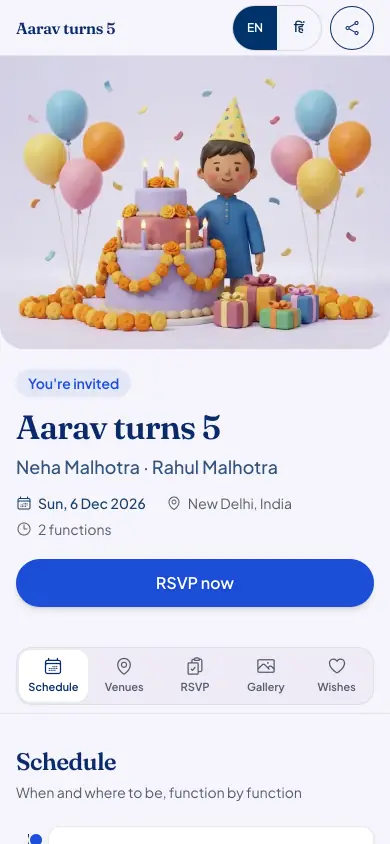
Yes. Pick Birthday when you create the celebration and name it as you like, such as 'Aarav turns five'. Add the party, and a puja or dinner if there is one, as functions. Guests get the time, the venue's map link and an RSVP with plus-ones, so you know the count before you order the cake.
Do guests need to install anything?
No. Guests open your link in any phone browser and can switch it to Hindi. On a page open to anyone with the link, they reply with their name and a tap, without an account. Only hosts and co-hosts use the app, and they can use the website instead.
Can my family help plan it?
Yes. Add brothers, sisters, parents or the other family as co-hosts. Each signs in with their own account, on the website or in the app, and works on the same guest list, schedule and replies, so nobody keeps a separate spreadsheet.
Is it for corporate events?
No. It is built for weddings and family celebrations, so it has no ticketing, agenda, badges or sponsor pages. An office lunch or a team party where you only need to know who is coming and where to go works the same way as a family function.
What it costs
Every plan has every feature on this page. Plans differ in how many guests and photos they fit. Prices are per celebration, in rupees.
Starter
Free first year
Up to 50 guests
then ₹499 for each extra year
Classic
₹14,999 one-time
Up to 400 guests
then ₹1,499 for each extra year
Grand
₹29,999 one-time
Unlimited guests (fair use)
then ₹2,999 for each extra year
Hosts can also run everything from the iPhone or Android app. Get the app
Read next


Start planning your celebration
Your page can be live in minutes. Then share one link on WhatsApp.