

Guide
Invitation and RSVP apps, compared honestly
Updated by the Eventos Hub team
Card makers, WhatsApp groups, Google Forms, wedding websites and RSVP apps: what each does well for an Indian wedding or family event, and what it misses.
There is no single best way to invite people and count replies. Here are the five usual ways for an Indian wedding or family event: what each does well, what it misses, and when it is the right pick. Eventos Hub is one of them, and this guide says where something else suits you better.
Four questions that decide it
How many functions?
One dinner needs one yes or no. A wedding with a haldi, a sangeet and a reception needs a reply, and a count, for each.
Do you need a headcount?
If a caterer or a venue needs numbers, you need plus-ones and food needs written down, not remembered from calls.
Who are your guests?
Elders who read Hindi, relatives abroad, and friends who never install anything change what will work.
Do you need a designed card?
If the look matters most, start with a designer or a card maker, then add a way to collect replies.
1. A card maker app
Apps such as Canva offer card and invitation video designs, including Indian wedding styles. The result is an image or a video you forward on WhatsApp.
- Good at: the look. Nothing else on this list designs a card.
- Misses: replies. A card cannot take an RSVP or change when a time does, so you still count replies by hand.
- Pick it when: you want a designed card. Pair it with something that collects replies.
2. A WhatsApp group or broadcast
Free, and everyone already has WhatsApp. Most families use it for something, whatever else they choose.
- Good at: reaching people fast, and quick questions.
- Misses: a count. Replies get buried in the chat, a poll cannot take plus-ones or food needs, and in a group everyone sees everyone's answer.
- Pick it when: the guest list is small and close, and nobody needs exact numbers.
3. Google Forms or a spreadsheet
Free, flexible, and the answers land in one sheet.
- Good at: a single event with a fixed list of questions, such as a 20-person office lunch.
- Misses: the invitation itself. Guests still need the timings and venues somewhere else, and one form rarely fits a family replying for six people across three functions.
- Pick it when: the event is simple and the guests are used to forms.
4. A wedding website
Wedding website services give the couple a page with the story, the schedule and an RSVP. Joy, for example, offers a free wedding website and app with RSVPs for each event.
- Good at: a wedding website with pages of your own, such as your story and a registry.
- Misses: what is specific to your family. Check whether it covers Hindi for elders, UPI for shagun and the functions you hold.
- Pick it when: your guests read English and you want a story page and a registry.
5. An invitation and RSVP app
These send an invitation as a link and collect replies on it. Evite and Partiful, both popular in the US, send party invitations with RSVPs and have free options. Eventos Hub is built for Indian weddings and family celebrations.
- Good at: the invite, the details and the reply in one place, with the count adding itself up.
- Misses: a designed card, unless you bring your own. And a link works only if guests open it, so send it where they already are.
- Pick Evite or Partiful when: you are hosting a casual party abroad and your guests already use them.
- Pick Eventos Hub when: you have several functions, elders who read Hindi, guests who would rather send shagun by UPI, or you want photos and wishes on the same link.
Facts about Eventos Hub you can check
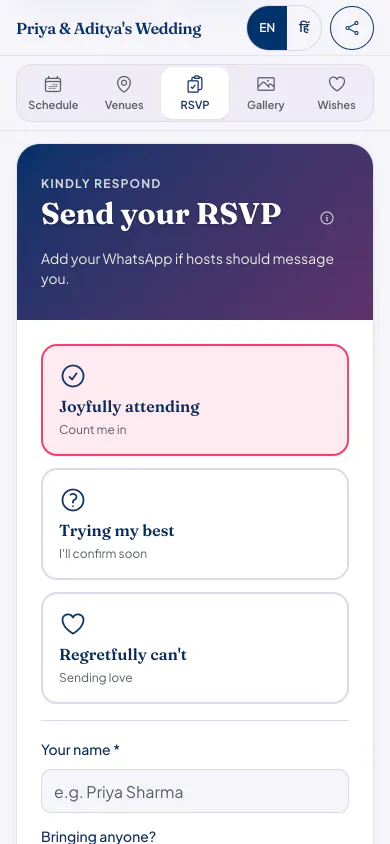
- Guests need no app and, on a page open to anyone with the link, no account to read the page and RSVP. The page opens in any phone browser, in English or Hindi.
- RSVP is per function, with plus-ones and food needs. Hosts see a headcount for each function and can download the list.
- Shagun goes from the guest's UPI app to the host's own UPI ID. Eventos Hub takes no cut and never holds the money.
- Find your photos is off until the host turns it on, and face data is deleted 90 days after the celebration.
- Pricing is per celebration, one-time, in rupees: the first Starter celebration, up to 50 guests, is free for its first year, and nothing renews automatically.
- It does not sell tickets, run conference agendas or design card images.
- Hosts use the website, the iPhone app (on the App Store since November 2026) or the Android app.
Who this guide is for
Families choosing how to invite for a wedding with several functions.
Hosts of a birthday, anniversary or griha pravesh who want replies without a dozen phone calls.
Anyone who searched for the best RSVP app and wants the trade-offs, not a ranking.
Questions families ask
What is the best RSVP app for an Indian wedding?
It depends on the wedding. For several functions, elders who read Hindi and shagun by UPI, an app built for Indian functions fits best. For an English-only wedding website with a registry, a service such as Joy fits. For a designed card, use a card maker and add an RSVP link.
Is there a free way to collect RSVPs?
Yes. Google Forms and WhatsApp polls are free, though neither adds up the plus-ones for each function for you. On Eventos Hub, your first Starter celebration is free for its first year, for up to 50 guests.
Do guests have to download an app to RSVP?
It depends on the tool. Some invitation apps ask guests to install them for parts of the experience. With Eventos Hub, guests reply in their phone's browser, and on a page open to anyone with the link they need no account.
Can I use a WhatsApp poll for RSVPs?
For a quick yes or no among close family, yes. A poll cannot take plus-ones or food needs, everyone sees everyone's vote, and new messages bury it. For a headcount the caterer will rely on, use a form or an RSVP page.
What it costs
Every plan has every feature on this page. Plans differ in how many guests and photos they fit. Prices are per celebration, in rupees.
Starter
Free first year
Up to 50 guests
then ₹499 for each extra year
Classic
₹14,999 one-time
Up to 400 guests
then ₹1,499 for each extra year
Grand
₹29,999 one-time
Unlimited guests (fair use)
then ₹2,999 for each extra year
Hosts can also run everything from the iPhone or Android app. Get the app
Invitations with RSVP built in


Read next


Try it on your own celebration
Your page can be live in minutes. Then share one link on WhatsApp.